Ahrefs Domain Rating scored 17 Nov 2026, score changed 3 Nov 2026.
An MCP server that lets Claude, Cursor and other AI assistants compare CAD files on your computer, showing changed features, assemblies and duplicates without
Match report
CAD Compare: the homepage
CAD Compare is an MCP server that runs on your computer and integrates with AI assistants like Claude and Cursor. It compares STEP files locally, analyzing changes in features, assemblies, and identifying duplicates. The comparison results are structured and returned to the assistant, while CAD files are never uploaded to servers or AI providers. Users can also view STEP files in a browser, measure parts, and detect unit mistakes.
Game plan
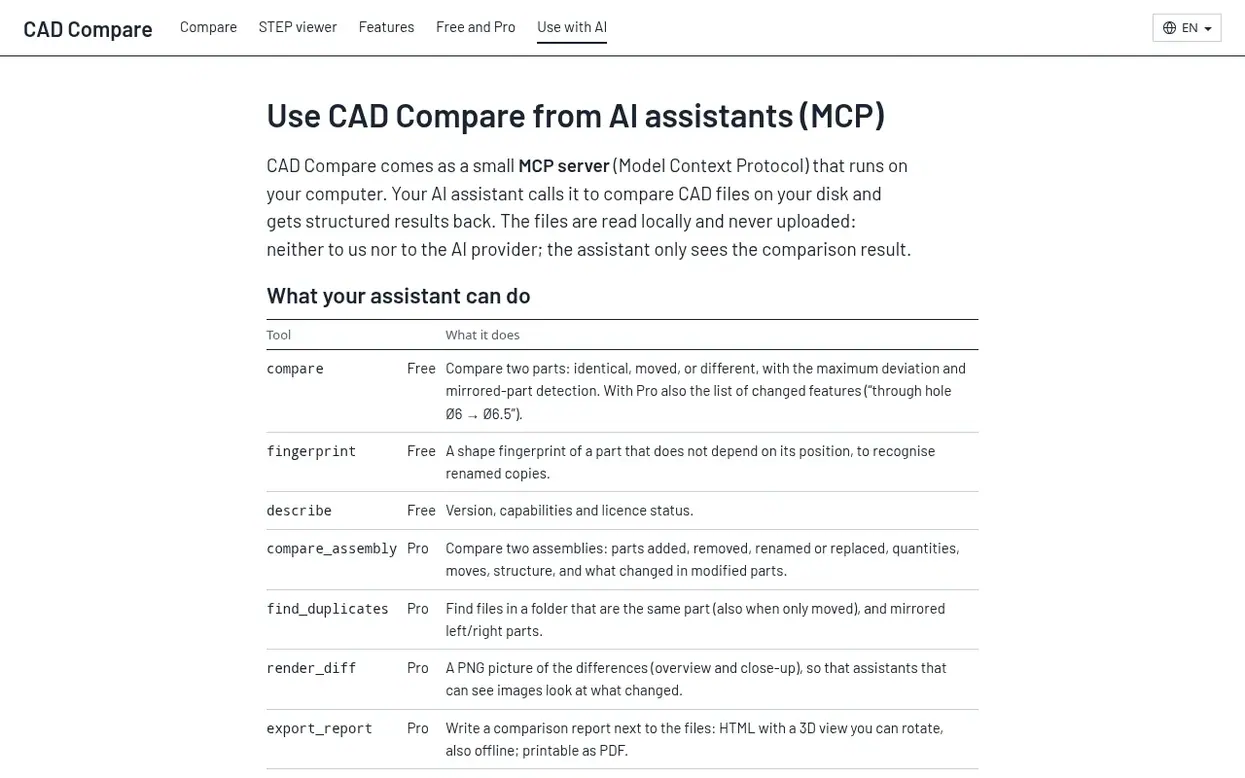
Compare two parts with identical, moved, or different detection and maximum deviation measurements
Recognize changed features by name with Pro license
Generate shape fingerprint to recognize renamed copies
Compare assemblies with part changes and structural differences
Find duplicate files in a folder including mirrored parts
Generate PNG pictures of differences with overview and close-up views
Export comparison reports as HTML and printable PDF
Detect unit mistakes between files differing by factor of 25.4
Measure parts with click-snapping to corners, edges and hole centers
View and repair broken STEP files with incorrect edge definitions
Pricing
Pricing model: Freemium
Free tools: compare two parts, fingerprint, and describe. Pro tools: compare assemblies, find duplicates, render diff images, and export reports. During beta, all features are free.
Get CAD Compare's news by email: milestones, updates, new products and founder stories. Follow to switch it on.
CAD Compare metrics
Scoreboard for cad-compare.com: Ahrefs Domain Rating and Majestic link scores, with the change since the last match.
0 Domain Rating ● no change since last check
0 Trust Flow ● no change since last check
0 Citation Flow ● no change since last check
0 Referring domains ● no change since last check
0 External backlinks ● no change since last check
Ahrefs Domain Rating scored 17 Nov 2026, score changed 3 Nov 2026. Majestic scored 3 Nov 2026, score changed 3 Nov 2026. Majestic keeps the link score. Trust Flow, Citation Flow and Topical Trust Flow are trademarks of Majestic-12 Ltd.
CAD Compare home ground
Show the home ground record
Read from the public RDAP record on 16 Nov 2026, 04:45 UTC.
Since CAD Compare launched on Velora Launch on 3 November 2026, these are the figures we have tracked.
Domain Rating (Ahrefs)
0● no change since launch
0 at launch (3 Nov 2026), 0 on 15 Nov 2026
Trust Flow (Majestic)
0
First measured 3 Nov 2026
Referring domains (Majestic)
0
First measured 3 Nov 2026
Day 12 since launch. Next receipt: day 30, 3 Dec 2026. Readings only: they do not prove what caused a change, and many things can. A metric we have no reading for is left out.
No. The comparison and viewer run in your browser or on your computer with an AI assistant. The server only handles your account and subscription, never your CAD files. Results are only uploaded if you choose to share them as a link, and the STEP files themselves are never uploaded.
Which file formats can I compare?
STEP files (.step and .stp are the same format) of single parts, multi-body parts and assemblies. Native formats such as SolidWorks or Fusion files, drawings (PDF) and meshes (STL) are not supported.
How exact are the comparison and measurements?
Both work on the exact CAD geometry in the files, not on triangles shown on screen. The comparison shows the tolerance it used with every result. Results that matter for production should be checked against the actual CAD models.
Which browsers and devices are supported?
Current versions of Chrome, Edge, Firefox and Safari on Windows, Mac and Linux, and on phones and tablets (iPhone, iPad, Android). Large parts and assemblies need a few seconds and enough memory.
Is it free and do I need an account?
Viewing, measuring a file and comparing two single parts are free with no account needed. Everything else requires signing in with a code sent to your email. During the beta, all features are free.
More on this profile
CAD Compare has a free listing. The owner can unlock the full profile with a paid launch for $5: